Optimizing Circulation Rates - Exporting results to excel
Instructions
-
This article contains a series of steps to feed the data to the flowsheet, run the simulation, interpret the results
-
User can either follow the series of steps mentioned in the article or download the ProTreat file attached to this article, review the inputs and run the simulation
Simulation Set Up
Objective
-
Target is 90% removal of CO₂ from the feed gas.
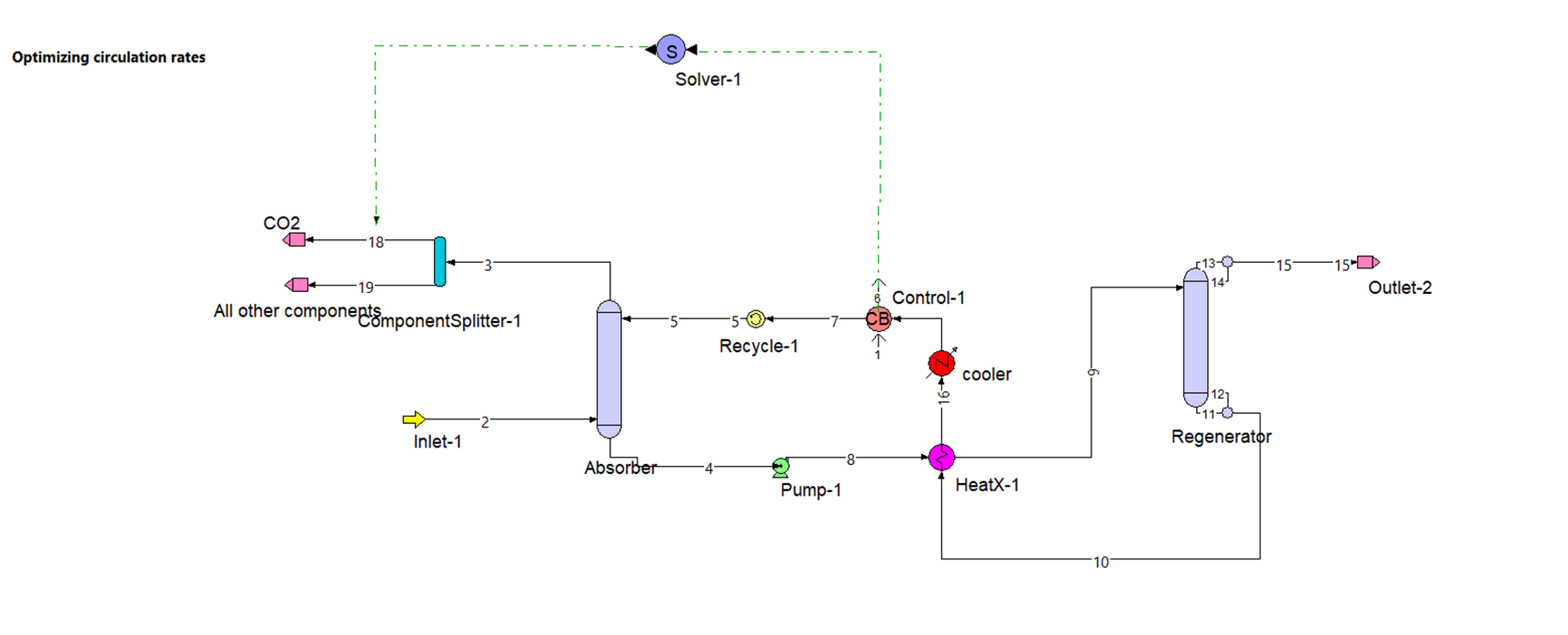
Flowsheet
-
Components:
Carbon dioxide, Hydrogen sulphide, Nitrogen, Oxygen, MEA, Water
-
Set up a conventional absorber & regenerator loop in ProTreat as shown in the flowsheet
-
Inputs taken for the exercise
-
Gas flow rate: 1,65,000 m³/hr
-
Temperature : 60 °C
-
Pressure : 1.03 kg/cm²
-
Component composition: (CO₂: 17.8%, H₂S: 5%, N₂: 56.5%, O₂: 2.5% , water: 18.2%, All in mol%)
-
Tray type: Generic valve trays
-
Number of trays: 20
-
Tray spacing: 0.6 meters
-
Number of passes: 4
-
Weir height: 0.05 meters
-
Foam derating Factor: 0.8
- Vapor flood & Downcomer flood: 70%
-
Pressure >>set pressure by feed stream: 2
-
Connect streams appropriately to absorber based on the flowsheet
-
Pump>>Outlet Pressure>>3.5 kg/cm²
-
Efficiency>>75%
-
HeatX-1>> Heat transfer>> Thermal spec>> Shell outlet temperature >> 90 °C
-
Apply LMTD correction factor>>Let ProTreat calculate
-
Select the check boxes that the column has reboiler and condenser, and has reflux to column (% return is 100%)
-
Tray type: Generic valve trays
-
Number of trays: 20
-
Tray spacing: 0.6 meters
-
Number of passes: 4
-
Weir height: 0.05 meters
-
Foam derating factor: 0.8
- Vapor flood & Downcomer Flood: 70%
-
Pressure>>set pressure by feed stream-9
-
Connect streams appropriately to absorber based on the flowsheet
-
Connect feed stream to the top tray in regenerator
-
Condenser/Reboiler>>Condenser>> Temperature>>40 °C
-
Condenser>>Pressure Drop>>0 kg/cm²
-
Reboiler>> Vapor return line pressure drop>>0 kg/cm²
-
Reboiler Steam Flow Ratio>>120 kg steam/std m³
-
Basis liquid stream for calculation>>Pump inlet stream
-
Pressure>>3.5 kg/cm²
-
Cooler>>Duty>>Outlet temperature>>35 °C
-
Stream Flow rate: 2,100 m³/hr
-
Composition : 30 wt. % MEA
-
Select method for calculating make up as “Control Block In/ Out Streams”
-
Recycle block stream is a tear stream. An educated guess values must be given for the initial calculations to proceed.
-
Select the preferred components and feed the input data in the respective recycle block.
-
Recycle flow rate: 1,200 m³/hr
-
Temperature: 50 °C
-
Pressure: 1.03 kg/cm²
-
Composition: (CO₂: 0.01 Loading, H₂S: 0.001 Loading, MEA: 30 wt. %)
-
Select water specification as “is remainder (solvent streams only)"
Component splitter
- Connect the treated gas to the component splitter that is used to separate CO₂ from the rest gas
- Split the CO2 to stream-18 and rest components to stream-19
Solver
Set up a solver block as shown in the flowsheet
Use Quadratic search (optional limits) as method of finding the solution
Adjustment variable>> Circulation rate
Target Variable>>Total flow of stream-18 i.e., pure CO₂ stream
Run Simulation
-
Run simulation and observe the circulation rate of the solvent
Results & Discussion
Output
-
Optimized circulation rate of the solvent in the loop by fixing the total flowrate of CO₂ in the treated gas is 3,217 m³/hr
Interpretation
- The target removal for this example is 90% of CO₂ from the feed gas.
- Here, we fixed that remaining 10% of CO₂ to flow in treated gas by optimizing the solvent circulation rate
Exporting reports to excel
- To export results from ProTreat to excel, go to the exports tab and select data to clipboard
- Select the required blocks of interest whose results have to be exported to excel
- Paste the copied data in a new excel file
Something to think about
- which one is economically viable, adjusting solvent rate or optimizing solvent strength to achieve desired CO₂ removal?
- In this case the reboiler duty is obviously a variable until the optimized circulation rate is found.
- For this case we got a reboiler duty of 227 MW.
- Suppose if there is a steam limitation for the reboiler and the maximum heat duty available is 227 MW what will be the optimized circulation rate in this case?
Related Articles
Understanding Temperature and Mass Transfer Pinches (Specifying multiple amines)-Base
Instructions This article contains a series of steps to feed the data to the flowsheet, run the simulation, interpret the results User can either follow the series of steps mentioned in the article or download the ProTreat file attached to this ...
Impact of Transport Properties on CO₂ Absorption
Instructions This article contains a series of steps to feed the data to the flowsheet, run the simulation, interpret the results User can either follow the series of steps mentioned in the article or download the ProTreat file attached to this ...
Impact of Reboiler Duty on Treating - Base
Instructions This article contains a series of steps to feed the data to the flowsheet, run the simulation, interpret the results User can either follow the series of steps mentioned in the article or download the ProTreat file attached to this ...
Impact of Reboiler Duty on Treating - Base
Instructions This article contains a series of steps to feed the data to the flowsheet, run the simulation, interpret the results User can either follow the series of steps mentioned in the article or download the ProTreat file attached to this ...
Simulating Blended Amines
Instructions This article contains a series of steps to feed the data to the flowsheet, run the simulation, interpret the results User can either follow the series of steps mentioned in the article or download the ProTreat file attached to this ...